Data Files
If I have generated data from another software program, how can I import it and use it in my game code?
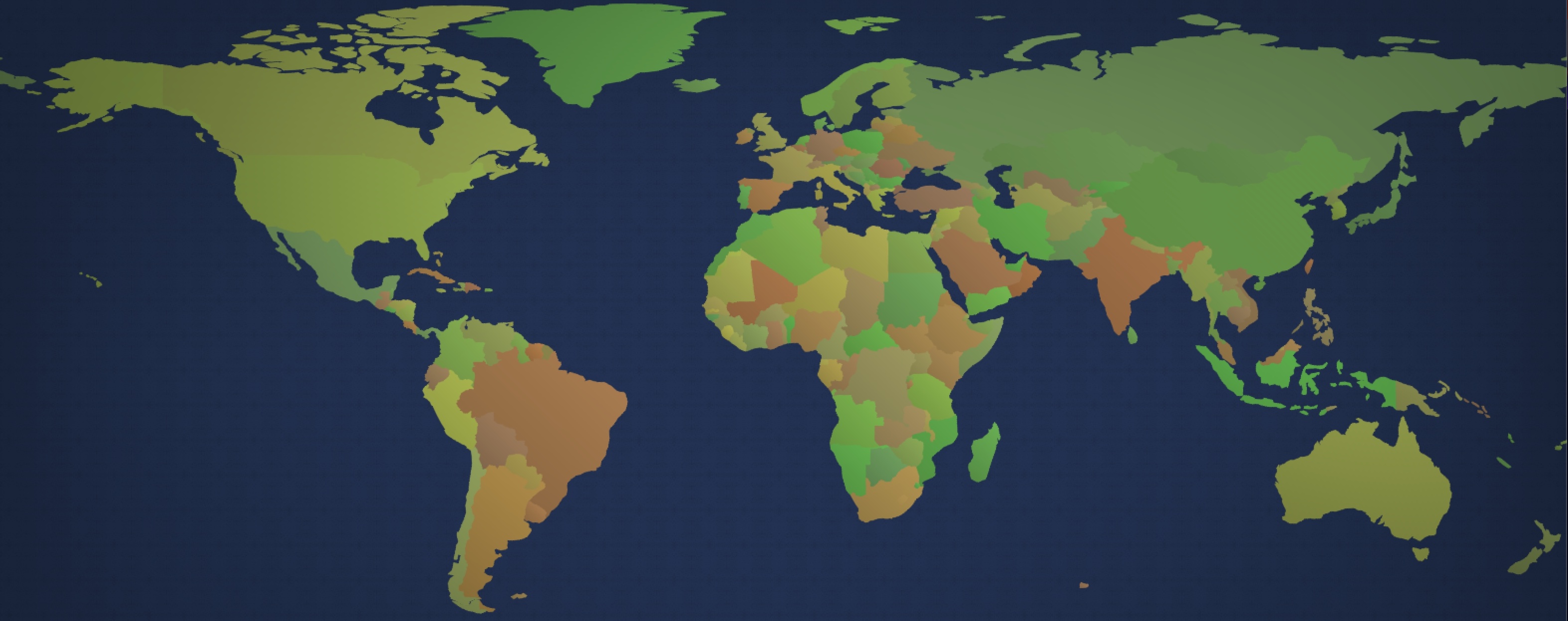
In this example, we will import world map data (thanks to Natural Earth) and use it to create a game where players race each other around the world!
See Data Files for a more conceptual overview of how to use data files in Easel.
Step 1: Add your data files to your project
Start by adding your JSON file directly into your project.
In our case, we downloaded the file world.geo.json from https://geojson-maps.kyd.au
and added it to our project folder.
Step 2: Import the data
To import the data from your JSON file, you can use the import statement.
This is how we import the world map data from our world.geo.json file into a variable named CountryData:
pub import CountryData from @world.geo.json as {
    features as [{
        id = properties.iso_a2 as String,
        name = properties.sovereignt as String,
        labelPos = @(properties.label_x, properties.label_y),
        geometry as {
            type as String,
            coordinates as [[Vector] | [[Vector]]],
        },
    }]
}
Notice, we are using the as keyword with a schema to convert the data
into a format ready to use in our game.
@(properties.label_x, properties.label_y)is used to combine the X and Y coordinates into a single Vector.coordinates as [[Vector] | [[Vector]]]is used to convert the coordinates into a list of Vectors. The reason why we specify two alternate patterns here[Vector] | [[Vector]]is because sometimes GeoJSON adds an extra level of nesting to the coordinates, depending on the type of geometry (Polygon vs MultiPolygon).
It is optional, but recommended, to use the as keyword to convert the data into a format ready to use in your game.
One key difference to be aware of is the as keyword converts all the String keys in JSON into Symbols in Easel,
which allows us to write data.labelPos instead of data["labelPos"] to access the data.
This is both faster to type and faster to run, because Symbols are more efficient than Strings.
See Schemas to learn more about this topic.
Step 3: Use the data
Now we have imported our world data into the CountryData variable,
we can use it to spawn country entities in our game world:
fn SpawnCountries() {
    for data in CountryData.features {
        Spawn country {
            Country(
                pos=data.labelPos*InvertY,
                countryId=data.id,
                countryName=data.name,
                shapes=GeoJsonDataToShapes(
                    geoJsonFeature=data,
                    // center the country around its label
                    // so the body's position is inside the country
                    center=data.labelPos,
                ),
            )
        }
    }
}
We have written a function GeoJsonDataToShapes to convert the GeoJSON data shapes into Easel shapes.
This function handles the different types of GeoJSON geometries (Polygon vs MultiPolygon)
using a match block:
fn GeoJsonDataToShapes(geoJsonFeature, center=@(0, 0)) -> shapes {
    let data = geoJsonFeature
    let shapes = []
    match data.geometry.type {
        "Polygon" => {
            for regionData in data.geometry.coordinates {
                shapes.Push(Polygon(regionData.Map(|p| (p - center) * InvertY)))
            }
        },
        "MultiPolygon" => {
            for multiRegionData in data.geometry.coordinates {
                for regionData in multiRegionData {
                    shapes.Push(Polygon(regionData.Map(|p| (p - center) * InvertY)))
                }
            }
        },
    }
    return shapes
}
See Data Files to learn more about how to import and use data files in Easel.
Full Code Listing
We have focused only on the parts related to importing and using data files in this example, but there is a lot more to this game! See the full code listing below to learn more.
pub tangible category Category:Hero
pub tangible category Category:Region

pub const BoundaryHalfWidth = 180
pub const BoundaryHalfHeight = 90
pub const InvertY = @(1, -1) // World is Y-up and Easel is Y-down so have to flip

const FireworkColors = [#f00, #0f0, #f80, #00f, #b0f]

pub import CountryData from @world.geo.json as {
    features as [{
        id = properties.iso_a2 as String,
        name = properties.name as String,
        labelPos = @(properties.label_x, properties.label_y),
        geometry as {
            type as String,
            coordinates as [[Vector] | [[Vector]]],
        },
    }]
}

fn GeoJsonDataToShapes(geoJsonFeature, center=@(0, 0)) -> shapes {
    let data = geoJsonFeature
    let shapes = []
    match data.geometry.type {
        "Polygon" => {
            for regionData in data.geometry.coordinates {
                shapes.Push(Polygon(regionData.Map(|p| (p - center) * InvertY)))
            }
        },
        "MultiPolygon" => {
            for multiRegionData in data.geometry.coordinates {
                for regionData in multiRegionData {
                    shapes.Push(Polygon(regionData.Map(|p| (p - center) * InvertY)))
                }
            }
        },
    }
    return shapes
}

prop World.ZoomToPlayer
pub game fn World.Main(maxHumanPlayers=5) {
    SolidBackground(#000)
    ImageSprite(@grain.png, body=@(0, 0), radius=4, color=#223355, repeatX=1000, repeatY=BoundaryHalfHeight/radius, layer=-100)
    Vignette(opacity=0.3)

    Camera(body=@(0, 0), radius=@(BoundaryHalfWidth, BoundaryHalfHeight))
    with ZoomToPlayer {
        if ZoomToPlayer {
            delete Camera<worldMap>
        } else {
            // High priority camera takes precedence over player camera
            Camera<worldMap>(body=@(0, 0), radius=@(BoundaryHalfWidth, BoundaryHalfHeight), acquireRate=0.1, priority=100)
        }
    }


    SpawnCountries

    SpawnEachPlayer owner {
        Print(audience=Audience:All) {
            P {
                PlayerNameDisplay
                " has entered the game"
            }
        }
        PrintOverlay(duration=3s) {
            H1 { FlyInWords("Who will get there first?") }
        }

        Subspawn unit {
            Hero
        }
    }

    await Tick(3s)
    loop {
        await PlayRound
    }
}

pub prop World.TargetCountry
pub prop World.HeroFoundCountry
await fn PlayRound() {
    await Spawn {
        TopContent<mission> {
            P(fontSize=2, bold=true) {
                for i in Range(0, 3) {
                    %(3-i)
                    await Tick(1s)
                }
            }
        }

        let country = PickRandom(AllCountries)
        TopContent<mission> {
            P(fontSize=2, animate=Animate:FlyFromBottom) {
                "Fly to "
                Span(bold=true, color=#0f0) { %(country.CountryName) }
                "!"
            }
        }

        HeroFoundCountry = null
        TargetCountry = country

        ZoomToPlayer = true
        while !HeroFoundCountry { await Tick }
        let unit = HeroFoundCountry
        let winner = unit.Owner
        ZoomToPlayer = false

        repeat 20 {
            Spark(
                body=unit, color=PickRandom(FireworkColors),
                radius=1, speed=10, dissipate=5s, layer=-1,
                glare=1, bloom=10, bloomAlpha=1, luminous=1, opacity=0.2,
            )
        }

        TopContent<mission> {
            P(fontSize=2, animate=Animate:FlyFromBottom) {
                PlayerNameDisplay(winner)
                " found "
                Span(bold=true, color=#0f0) { %(country.CountryName) }
                "!"
            }
        }

        await Tick(2s)
        Expire
    }
}

fn SpawnCountries() {
    for data in CountryData.features {
        Spawn country {
            Country(
                pos=data.labelPos*InvertY,
                countryId=data.id,
                countryName=data.name,
                shapes=GeoJsonDataToShapes(
                    geoJsonFeature=data,
                    // center the country around its label
                    // so the body's position is inside the country
                    center=data.labelPos,
                ),
            )
        }
    }
}

pub collect World.AllCountries
pub field country.CountryId
pub field country.CountryName
pub field region.RegionCountry
pub fn country.Country(pos, countryId, countryName, shapes) {
    use body=this
    let color=HSL(25deg + 90deg*Random, 0.35 + 0.1*SignedRandom, 0.5)

    CountryId = countryId
    CountryName = countryName

    Body(pos=, immovable=true)

    for use shape in shapes {
        Subspawn region {
            RegionCountry = country
            PolygonSprite(color=, layer=-50, shading=0.2)
            PolygonCollider(
                category=Category:Region,
                collideWith=Category:None, sense=Category:Hero,
            )
        }
    }

    give AllCountries(country)
}

pub prop unit.HeroRegion
pub fn unit.Hero([owner]) {
    use body=unit, radius=0.5, color=#fff
    Body(pos=@(SignedRandom*100, SignedRandom*15), heading=1rev*Random)
    ImageSprite(@plane.png, radius=4*radius, ownerColor=0.5, angleOffset=0.25rev)
    PolygonSprite(Circle(radius=0), bloom=5, bloomAlpha=1, ownerColor=true, luminous=1, opacity=0.2)
    ImageSprite(@plane-shadow.png, radius=4*radius, feather=0.5, screenOffset=@(0, 1.5 * radius), angleOffset=0.25rev, opacity=0.5, layer=-1)
    PolygonCollider(shape=Circle, category=Category:Hero, sense=Category:Region)
    TextSprite(PlayerName, fontSize=1, screenOffset=@(0, -3*radius), vAlign=VAlign:Bottom, color=#fff, upright=true, strobe=false)
    Camera(radius=12, noRotation=false, angleOffset=0.25rev, acquireRate=0.1, panningRate=1)

    on BeforePhysics {
        if Joystick.X != 0 {
            TurnRate *= 0.99
            TurnRate += 0.005rev * Joystick.X
        } else {
            TurnRate *= 0.1
        }

        let direction = Heading.Direction
        let targetSpeed = (0.5*(1 + -Joystick.Y)).Mix(2, 8)
        Velocity += 0.1 * direction * (targetSpeed - Velocity.Dot(direction)) // accelerate to cruising speed
        Velocity -= 0.1 * direction.RotateRight * Velocity.Dot(direction.RotateRight)  // reduce cross speed

        Spark(color=#fff, bodyOffset=@(0.5*radius, -radius), splatter=0.5, feather=1, glare=1, opacity=0.05, layer=-1, dissipate=1s)
        Spark(color=#fff, bodyOffset=@(0.5*radius, radius), splatter=0.5, feather=1, glare=1, opacity=0.05, layer=-1, dissipate=1s)

        // Wrap around world
        if Pos.X.Abs > BoundaryHalfWidth && Velocity.X.Sign == Pos.X.Sign {
            delete Streak<trail>
            Pos *= @(-1, 1)
        }
        if Pos.Y.Abs > BoundaryHalfHeight && Velocity.Y.Sign == Pos.Y.Sign {
            delete Streak<trail>
            Pos *= @(-1, 1)
            Velocity *= @(1, -1)
            Heading += 0.5rev
        }
    }

    on BeforeCollide that {
        if !that.RegionCountry { continue }
        HeroRegion = that
    }
    on AfterCollide that {
        if !that.RegionCountry { continue }
        if HeroRegion == that {
            HeroRegion = null
        }
    }

    with HeroRegion {
        if HeroRegion {
            TextSprite<countryName>(
                HeroRegion.RegionCountry.CountryName,
                fontSize=0.9, bold=true, screenOffset=@(0, 3*radius), vAlign=VAlign:Top,
                color=#fff, upright=true, strobe=false,
            )
        } else {
            delete TextSprite<countryName>
        }
    }

    with TargetCountry, HeroRegion {
        if TargetCountry && TargetCountry == HeroRegion.RegionCountry {
            HeroFoundCountry = unit
        }
    }

    BottomLeftContent {
        VirtualJoystick(radius=5, padding=2) {
            Image(@dPad.svg, expand=true, stretch=true)
        }
    }
}