Jumping (Platformer)
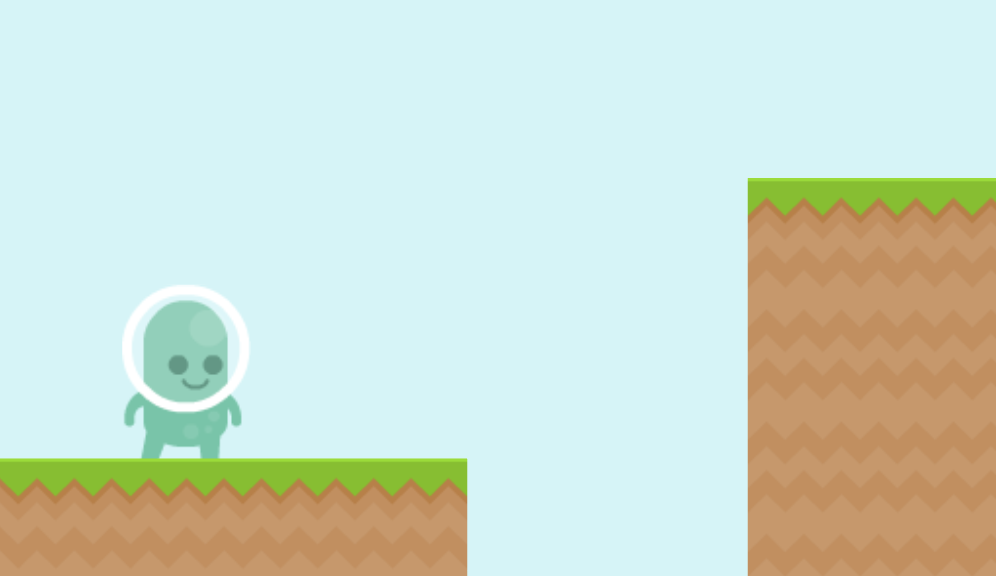
How can I make a side-view platformer where the player can run and jump?
This example shows you how to make the running and jumping mechanics of a side-view platformer game. Running and jumping is surprisingly intricate:
- Jumping can only occur if the player is on the ground.
- After leaving a cliff, the player can still jump for a short while (coyote time).
- The player falls faster when they release the jump button, helping them land more precisely.
- Friction applies when the player is on the ground, but not when they are in the air.
This example will cover all of these points, and additionally we will use some graphics from Kenney to make it look cool!
Step 1: Create a Hero unit
First, we need a Hero that we can control:
pub fn unit.Hero([owner]) {
    use body=this, radius=1, shape=Capsule(extent=0.5, angle=-0.25rev)
    Body(pos=@(-20, 0), noRotation=true)
    PolygonSprite(color=#0f0)
    PolygonCollider(category=Category:Hero, intercept=true)

    // ...
}
-
We have chosen to use a
Capsuleshape for the hero, which is round on the bottom. This helps the hero move up slopes and prevents them from getting stuck on small bumps in the ground. ACircleshape could work as well. -
The
noRotation=trueoption keeps the hero upright. Without it, they could be knocked over sideways by collisions. -
We set
intercept=trueto enable continuous collision detection. This stops the hero from tunneling through thin platforms when they are moving fast, for example when they are falling from a great height. While this is computationally expensive, there is only one hero in the game, so it is worth it to make its movements right. This should not be enabled for every entity in the game, as it would slow down the physics simulation. -
In this example, we have hardcoded the
Herounit to spawn at a specific position@(-20, 0), but in a real game you would likely take this as a parameter to theHerofunction so that you can spawn the player at the location appropriate to your level design.
Step 2: Detect if the Hero is on the ground
Because so much of our logic needs to know if the hero is on the ground or not,
we will create a property IsTouchingGround and update it every tick after the physics simulation.
We will also create a property called LastGroundTouchAt that will store the last tick when the hero was on the ground,
which we will use to implement coyote time.
pub prop unit.IsTouchingGround = false
pub prop unit.LastGroundTouchAt = null
pub fn unit.Hero([owner]) {
    // ...

    on AfterPhysics {
        IsTouchingGround = QueryAnyContact(direction=@(0, 1), filter=Category:Tangible)
        if IsTouchingGround {
            LastGroundTouchAt = Tick
        }
    }
}
-
Here we use QueryAnyContact to detect whether the hero is touching something below them (in the positive Y direction).
-
We use the
Category:Tangiblefilter to only detect collisions with things that are solid and can be stood on. This may not just be the ground, but also the heads of enemies or even bullets. If there are things in your game that the player should not be able to jump off, you may want to limit this to a more specific category.
Step 3: Running
Now, when the player presses the left or right arrow keys, we want to accelerate the hero in that direction.
on BeforePhysics {
    let direction = 0
    if IsButtonDown(ArrowLeft) { direction += -1 }
    if IsButtonDown(ArrowRight) { direction += 1 }

    // Friction when going in wrong direction
    if IsTouchingGround && Velocity.X.Sign != direction {
        Velocity *= @(0.8, 1)
    }

    // Accelerate up to a top speed
    if direction != 0 && Velocity.X * direction < 10 {
        Velocity += @(0.6 * direction, 0)
    }
}
-
We apply friction by reducing the velocity by a factor of
0.8each tick, meaning they keep 80% of their speed. This gives them a bit of a stopping distance and can make the character feel like they have some heft to them. -
We accelerate the hero by adding to their velocity in the direction of movement. This means they need to do a bit of a run-up to build up speed and make long jumps.
Step 4: Jumping
When the player presses the up arrow key, we want to make the hero jump, but only if they are on the ground or have recently left the ground (coyote time).
Once the player has released the up arrow key, they will begin to fall faster. This is a common mechanic in platformers that allows for more precise control over the landing position. This also means that holding the jump button will allow the player to jump higher and further.
on ButtonDown(ArrowUp) {
    // Must be touching ground to jump.
    // After leaving a cliff, can still jump for a short while (coyote time)
    if !(IsTouchingGround || LastGroundTouchAt && Tick - LastGroundTouchAt < 0.1s) { continue }

    Velocity += @(0, -25)

    // Hold button to jump further
    await AfterPhysics // have to actually leave the ground before checking the condition
    while IsButtonDown(ArrowUp) && !IsTouchingGround { await Tick }

    // Fall faster when player releases button
    GravityScale = 2.0
    while !IsTouchingGround { await IsTouchingGround }
    GravityScale = 1.0
}
The await keyword lets us wait for something to happen before continuing to the next step.
This lets us write code in a step-by-step manner, which is much easier to read than a state machine or a bunch of flags,
which you might see in other game engines.
See Asynchronous Programming to learn more about this.
Step 5: Artwork
Our hero is currently just a green rectangle. Let's make it look like a real character!
5a: Creating the properties
Our graphics (from Kenney) include a standing, walking, and jumping animations for the hero. So we need to add some properties to track whether the hero is walking or jumping, and which direction they are facing.
pub prop unit.Facing = 1
pub prop unit.IsWalking = false
pub prop unit.IsJumping = false
5b: Displaying the correct image
When the properties change, we must choose the correct image to display.
We can do this with an ImageSprite that uses a with block to rerun whenever the properties change.
pub fn unit.Hero([owner]) {
    // ...

    with Facing, IsWalking, IsJumping {
        ImageSprite(
            radius=(1.6*radius),
            bodyScale=@(Facing, 1),
            image = (
                if IsJumping { @p1_jump.png }
                else if IsWalking { @p1_walk*.png }
                else { @p1_stand.png }
            ),
        )
    }

    // ...
}
-
It is very common to have a
Facingproperty to track which direction the hero is facing, so that we can flip the image when they turn around. You cannot derive the facing from the velocity because sometimes the player is trying to turn around but is still moving in the old direction due to momentum. -
The
@p1_walk*.pngsyntax is a shorthand for@p1_walk01.png,@p1_walk02.png, etc. and will automatically cycle through the images to create an animation. See Assets to learn more about this syntax.
5c: Setting IsJumping
Now our ImageSprite is ready to display the correct image based on the properties, but we need to actually set those properties in our code.
We can just add IsJumping = true at the top and IsJumping = false at the bottom of the jump code.
    on ButtonDown(ArrowUp) {
        // Must be touching ground to jump.
        // After leaving a cliff, can still jump for a short while (coyote time)
        if !(IsTouchingGround || LastGroundTouchAt && Tick - LastGroundTouchAt < 0.1s) { continue }

        IsJumping = true
        Velocity += @(0, -25)

        // Hold button to jump further
        await AfterPhysics // have to actually leave the ground before checking the condition
        while IsButtonDown(ArrowUp) && !IsTouchingGround { await Tick }

        // Fall faster when player releases button
        GravityScale = 2.0
        while !IsTouchingGround { await IsTouchingGround }
        GravityScale = 1.0
        IsJumping = false
    }
5d: Setting Facing and IsWalking
The Facing and IsWalking properties can be set in the BeforePhysics block where we handle the left and right movement.
When the player presses left or right, we set the Facing property to the direction they pressed,
and set IsWalking = true. When they are not pressing any directional button, we set IsWalking = false.
    on BeforePhysics {
        let direction = 0
        if IsButtonDown(ArrowLeft) { direction += -1 }
        if IsButtonDown(ArrowRight) { direction += 1 }

        // ...

        // Turn to face the direction
        if direction != 0 {
            Facing = direction
            IsWalking = true
        } else {
            IsWalking = false
        }
    }
A common pitfall for Easel beginners is not using enough properties.
You might think that when the player starts walking, you need to set your image to @p1_walk01.png,
when actually you should just set a property IsWalking = true and let the image sprite automatically update based on that property.
This deals with all the cases where multiple things are happening - for example,
if you start walking while jumping, you want the jump image to take priority over the walk image,
and that happens naturally with this approach.
Full Code Listing
pub tangible category Category:Hero
pub tangible category Category:Wall

pub const Tile = 2

pub const SceneHalfWidth = 25
pub const SceneHalfHeight = 15
pub const SceneRadii = @(SceneHalfWidth, SceneHalfHeight)
pub const SceneSize = @(2*SceneHalfWidth, 2*SceneHalfHeight)

pub game fn World.Main() {
    TopContent {
        InsetPanel { "Arrow keys to move and jump. Hold to jump further!" }
    }

    SolidBackground(#d3f4f7)
    Gravity=@(0, 50)

    Spawn { Level1 }

    SpawnEachPlayer owner {
        loop {
            await Subspawn unit {
                Hero
            }
        }
    }
}

pub prop unit.Facing = 1
pub prop unit.IsWalking = false
pub prop unit.IsJumping = false
pub prop unit.IsTouchingGround = false
pub prop unit.LastGroundTouchAt = null
pub fn unit.Hero([owner]) {
    use body=this, radius=1, shape=Capsule(extent=0.5, angle=-0.25rev)
    Body(pos=@(-20, 0), noRotation=true)
    PolygonCollider(category=Category:Hero, intercept=true)

    on Paint {
        Camera(unit.Pos.Quantize(SceneSize), radius=SceneRadii, panningRate=0.1)
    }

    with Facing, IsWalking, IsJumping {
        ImageSprite(
            radius=(1.6*radius),
            bodyScale=@(Facing, 1),
            image = (
                if IsJumping { @p1_jump.png }
                else if IsWalking { @p1_walk*.png }
                else { @p1_stand.png }
            ),
        )
    }

    on AfterPhysics {
        if Pos.Y >= SceneHalfHeight { Expire } // Fallen off cliff
    }

    on AfterPhysics {
        IsTouchingGround = QueryAnyContact(direction=@(0, 1), filter=Category:Tangible)
        if IsTouchingGround {
            LastGroundTouchAt = Tick
        }
    }

    on BeforePhysics {
        let direction = 0
        if IsButtonDown(ArrowLeft) { direction += -1 }
        if IsButtonDown(ArrowRight) { direction += 1 }

        // Friction when going in wrong direction
        if IsTouchingGround && Velocity.X.Sign != direction {
            Velocity *= @(0.8, 1)
        }

        // Accelerate up to a top speed
        if direction != 0 && Velocity.X * direction < 10 {
            Velocity += @(0.6 * direction, 0)
        }

        // Turn to face the direction
        if direction != 0 {
            Facing = direction
            IsWalking = true
        } else {
            IsWalking = false
        }
    }

    on ButtonDown(ArrowUp) {
        // Must be touching ground to jump.
        // After leaving a cliff, can still jump for a short while (coyote time)
        if !(IsTouchingGround || LastGroundTouchAt && Tick - LastGroundTouchAt < 0.1s) { continue }

        IsJumping = true
        Velocity += @(0, -25)

        // Hold button to jump further
        await AfterPhysics // have to actually leave the ground before checking the condition
        while IsButtonDown(ArrowUp) && !IsTouchingGround { await Tick }

        // Fall faster when player releases button
        GravityScale = 2.0
        while !IsTouchingGround { await IsTouchingGround }
        GravityScale = 1.0
        IsJumping = false
    }
}

pub fn this.Level1() {
    Subspawn unit { Water(pos=@(0, 20), width=1000*Tile, height=10*Tile) }

    ImageSprite(body=@(-14, -8), image=@cloud1.png, radius=5)
    ImageSprite(body=@(0, -9), image=@cloud2.png, radius=5)
    ImageSprite(body=@(17, -10), image=@cloud3.png, radius=5)

    Subspawn unit { Platform(pos=@(-20, 10), width=5*Tile, height=5*Tile) }
    Subspawn unit { Platform(pos=@(-5, 10), width=5*Tile, height=10*Tile) }
    Subspawn unit { Platform(pos=@(12, 10), width=2*Tile, height=10*Tile) }
    Subspawn unit { Platform(pos=@(18, 10), width=2*Tile, height=10*Tile) }
    Subspawn unit { Platform(pos=@(30, 8), width=6*Tile, height=10*Tile) }

    Subspawn unit { Platform(pos=@(50, 16), width=2*Tile, height=10*Tile) }

    ImageSprite(body=@(38, -15), image=@cloud1.png, radius=5)
    ImageSprite(body=@(50, -9), image=@cloud2.png, radius=5)
    ImageSprite(body=@(62, -10), image=@cloud3.png, radius=5)

    Subspawn unit { Platform(pos=@(60, 2), width=2*Tile, height=Tile) }
    Subspawn unit { Platform(pos=@(55, -4), width=Tile, height=Tile) }
    Subspawn unit { Platform(pos=@(60, -10), width=Tile, height=Tile) }
    Subspawn unit { Platform(pos=@(55, -16), width=Tile, height=Tile) }
    Subspawn unit { Platform(pos=@(63, -22), width=5*Tile, height=Tile) }

    ImageSprite(body=@(37, -34), image=@cloud1.png, radius=5)
    ImageSprite(body=@(49, -40), image=@cloud2.png, radius=5)
    ImageSprite(body=@(62, -30), image=@cloud3.png, radius=5)

    TextSprite("You are the chosen one!", body=@(63, -28), radius=1, color=#0004)
}

pub fn unit.Platform(pos, width, height) {
    use body=this, radius=0.5*Tile, shape=Rectangle(width=, height=)

    Body(pos=, immovable=true)
    PolygonCollider(category=Category:Wall)

    let numCols = width / Tile
    let numRows = height / Tile
    let topYOffset = -numRows + radius
    ImageSprite(image=@grassMid.png, repeatX=numCols, bodyOffset=@(0, topYOffset))
    ImageSprite(image=@grassCenter.png, bodyOffset=@(0, radius), repeatX=numCols, repeatY=numRows-1)
}

pub fn unit.Water(pos, width, height) {
    use body=this, radius=0.5*Tile

    Body(pos=, immovable=true)

    with Paint {
        let proportion = (Tick % 1s) / 1s
        let shiftX = proportion*Tile

        let numCols = width / Tile
        let numRows = height / Tile
        let topYOffset = -numRows + radius
        ImageSprite(image=@liquidWaterTop_mid.png, repeatX=numCols, bodyOffset=@(shiftX, topYOffset))
        ImageSprite(image=@liquidWater.png, bodyOffset=@(shiftX, radius), repeatX=numCols, repeatY=numRows-1)
    }
}