Minimap
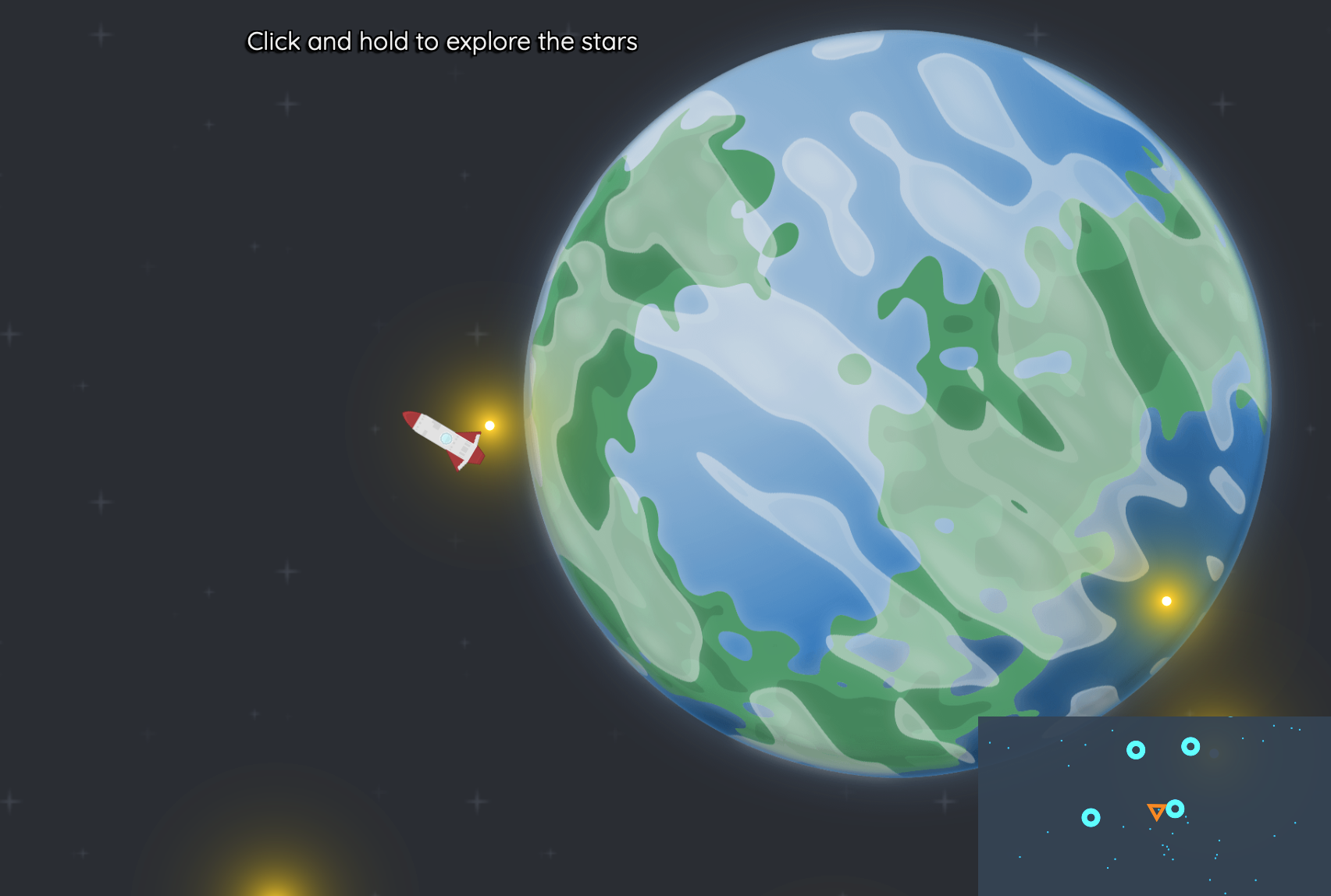
How can I make a minimap that shows the positions of important objects beyond the player's immediate view?
You can create a minimap in Easel by using a second camera. This involves three steps:
- Spawn an entity to represent your minimap camera.
- Aim your minimap camera at the player (or whatever entity you want it to follow).
- Render sprites to your minimap camera.
There is a full example of this at the bottom of this page.
See Cameras for a broader overview of how cameras work in Easel.
Step 1: Spawn a minimap camera
Spawn a globally-accessible entity to represent your minimap camera,
giving it a name like Camera:Minimap.
- Use the Viewport function to place the minimap camera's view in a small rectangle in the corner of the screen.
pub const Camera:Minimap = Spawn camera {
    Viewport(scale=0.2, anchor=@(1,1)) // Minimap viewport in the top-right corner
    SolidBackground(color=#334e) // Minimap background color so it covers the main camera's background
}
Step 2: Aim the minimap camera
Now that you've declared your Camera:Minimap, you can make your minimap camera follow the player,
or whatever other entity you want it to follow.
- Use the Camera function to decide where the minimap camera should be looking.
pub fn unit.Ship([owner]) {
    use body=this
    Body(pos=20*RandomVector)

    // ... sprites, collider, etc ...

    Camera(radius=25) // Main camera follows the ship, more zoomed in
    Camera(camera=Camera:Minimap, radius=50) // Minimap camera follows the ship, more zoomed out
}
Step 3: Render sprites to the minimap camera
Normally minimaps display a schematic view of the world, using icons or simple shapes to represent players and objects, and so you would render different sprites to your minimap camera than you would to your main camera. Then you can render some sprites into that camera specifically.
Pass in the camera=Camera:Minimap argument to PolygonSprite or ImageSprite
in order to render it to the minimap camera instead of the main camera.
If you do not pass this parameter it, your sprite will be rendered to the main camera by default.
    ImageSprite(image=@rocket.png, angleOffset=0.25rev) // render to main camera by default
    PolygonSprite(shape=Equilateral(numPoints=3, radius=3), color=#f80, crater=0.4, camera=Camera:Minimap) // render to minimap camera
Why 3 steps not 1?
Each of these steps is performed by a different entity in the game world, and so must be in different parts of the codebase:
- The minimap camera is its own entity, declared once for the entire game world
- The player's hero decides the position of the minimap camera
- All the entities in the world (ships, zombies, companion cubes, etc.) render their own sprites into the minimap camera
Full Code Listing
Below is a small example of a spaceship exploring the stars, click Open in Editor to play:
pub const Camera:Minimap = Spawn camera {
    Viewport(scale=0.2, anchor=@(1,1)) // Minimap viewport in the top-right corner
    SolidBackground(color=#345e) // Minimap background color so it covers the main camera's background
}

pub game fn World.Main(maxHumanPlayers=5) {
    TopContent { "Click and hold to explore the stars" }
    ImageSprite(body=@(0, 0), image=@starfield.png, radius=5, repeatX=1000, repeatY=1000, layer=-100)

    SpawnEachPlayer owner {
        Spawn unit {
            Ship
        }
    }

    // Spawn some stars so the minimap has something to show
    repeat 100 {
        Spawn unit {
            Star
        }
    }

    for i in Range(0, 10) {
        Spawn unit {
            Planet(index=i)
        }
    }
}

pub fn unit.Ship([owner]) {
    use body=this
    use radius=1, layer=10

    Body(pos=20*RandomVector)
    PolygonCollider(category=Category:Default, shape=Circle)

    Camera(radius=10) // Main camera follows the ship, more zoomed in
    Camera(camera=Camera:Minimap, radius=50) // Minimap camera follows the ship, more zoomed out

    ImageSprite(image=@rocket.png, angleOffset=0.25rev) // render to main camera by default
    PolygonSprite(shape=Equilateral(numPoints=3, radius=3), color=#f80, crater=0.4, camera=Camera:Minimap) // render to minimap camera

    on Pointer {
        Heading = Angle(Pointer - Pos)
    }
    on BeforePhysics {
        if !IsButtonDown(Click) { continue }
        Velocity += 0.1 * Heading.Direction
        Spark(
            color=#f80, radius=0.25*radius,
            luminous=1, glare=0.1, bloom=1, bloomAlpha=1,
            splatter=1,velocity=-5*Heading.Direction,
            bodyOffset=@(-radius, 0), layer=layer-1,
        )
    }
}

pub fn unit.Star() {
    use body=this
    Body(pos=200*RandomVector*Random)
    PolygonSprite(shape=Circle(radius=0.1), color=#fc0, glare=1, bloom=3, bloomAlpha=1) // Render star to main camera
    PolygonSprite(shape=Circle(radius=0.5), color=#0cf, camera=Camera:Minimap) // Render star to minimap camera
}

pub fn unit.Planet(index) {
    use body=this
    Body(pos=200*RandomVector*Random)
    ImageSprite(image=@planet*.png[index], radius=10)
    PolygonSprite(shape=Circle(radius=5), color=#0cf, luminous=1, crater=0.4, camera=Camera:Minimap)
}