Multiplayer
How can I make a multiplayer game in Easel?
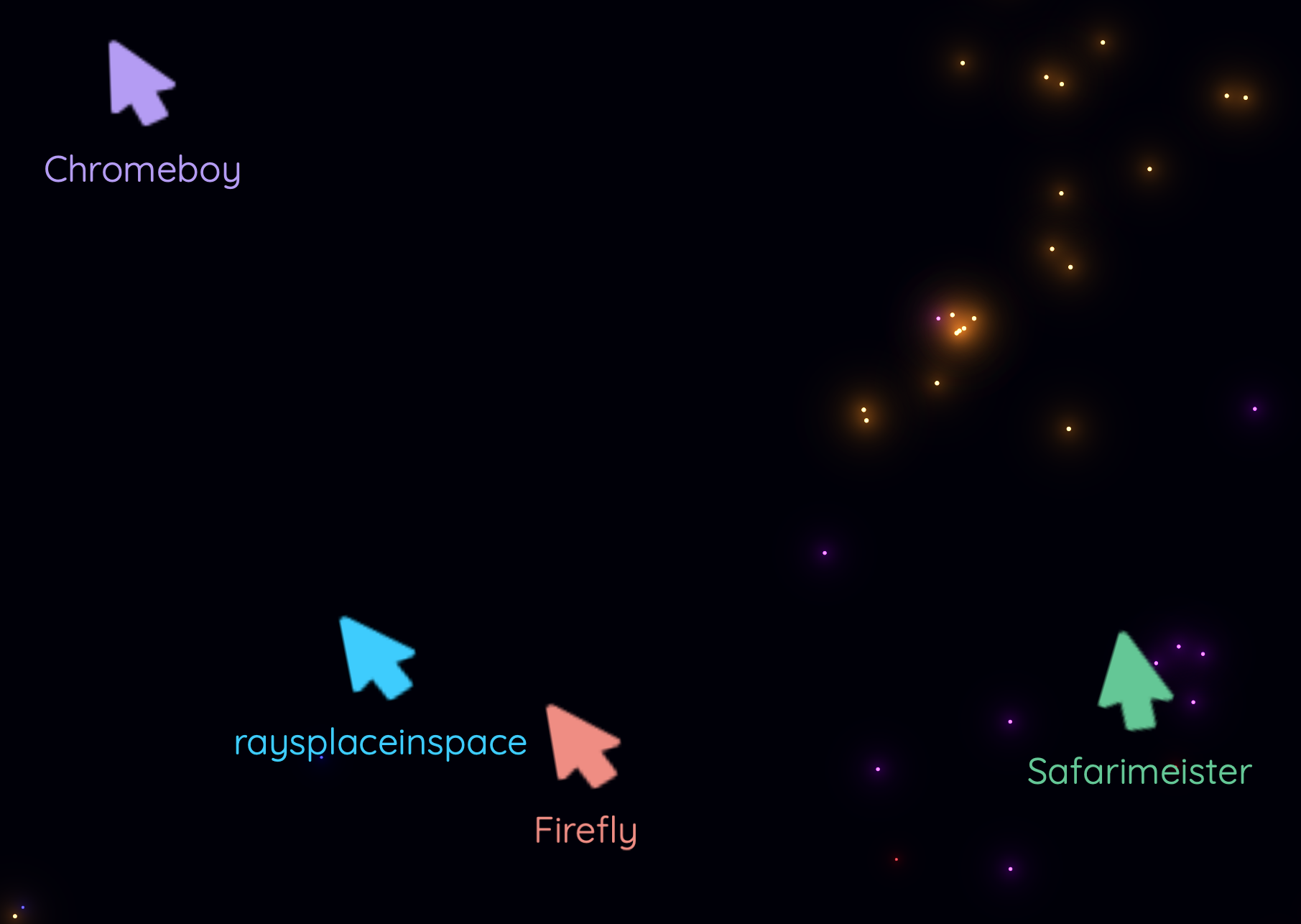
In this example, we will create a simple "cursor party" multiplayer game where the people can dance around the screen together by shaking their mouse cursors. People will first join the room, and once someone clicks "Start the Party!", fireworks will go off and everyone will be able to dance their cursors around the screen together. This will illustrate a typical multiplayer game flow with Easel.
See Multiplayer for a broader overview of how multiplayer works in Easel.
Step 1: Set max players
To make your game multiplayer,
simply set the maxHumanPlayers parameter in your World.Main function to a number greater than 1.
pub game fn World.Main(maxHumanPlayers=10) {
    // ...
}
Now your game is multiplayer and can support up to 10 players at once! From this point forward, you can pretend as if all your players are in one shared world, like a singleplayer game, and Easel will take care of the rest.
Step 2: Spawn each player
Use the SpawnEachPlayer function to define what happens for each player in the game.
In our case, we are going to spawn a Hero unit for each player in the game.
    SpawnEachPlayer owner {
        Subspawn unit {
            Hero
        }
    }
We use Subspawn to spawn the Hero unit for each player so that if the player leaves the game,
their Hero will be automatically removed from the game as well.
Step 3: Commence the game
In some multiplayer games, you need to wait until you have enough players before starting the game. At that point, you can lock the game so that no new players can join and the game begins. In Easel, you can use the CommenceGame function to lock your game.
In other types of games, players can freely join and leave the game at any time.
In that case, simply don't call CommenceGame and your game will remain open to new players.
This example will illustrate the first type of game, where we wait for players to join and then start the game.
Step 3a: Triggering the start of the game
At the start of the game, we will present the players with a "Start the party!" button. This will trigger the CommenceGame function, which will lock the game and start it.
pub fn dialog.StartGameSystem() {
    BottomRightContent {
        RaisedButton(PressIntent<startGame>, backgroundColor=Color:Primary) { "Start the party!" }
    }

    once Pressed<startGame> { CommenceGame }
    once GameCommenced { Expire }
}
To create this dialog at the start of the game, we will spawn it in our Main function:
pub game fn World.Main(maxHumanPlayers=10) {
    // ...
    Spawn dialog { StartGameSystem }
}
There are many ways to trigger the start of the game. Clicking "Start Game" is one example, but you could also start the game automatically once a certain number of players have joined, or after a countdown timer has expired.
Step 3b: What happens when the game starts
When the game starts, we will create a FireworksSystem that will create fireworks for all players to enjoy.
We can do this by responding to the GameCommenced signal:
pub game fn World.Main(maxHumanPlayers=10) {
    // ...
    once GameCommenced {
        FireworksSystem
    }
}
You can attach as many behaviors as you want to the GameCommenced signal,
and they will all be triggered when the game starts.
If the game has already commenced, GameCommenced will trigger immediately, and so it is a reliable way
to trigger behaviors that should be part of your game once it has started.
Full Code Listing
To try this game out, open the code in the editor and click Preview! There is an Invite button in the top right which will let you send a link to your friends so they can join the party!
const FireworkColors = [ #f00, #0f0, #f80, #00f, #b0f ]

pub game fn World.Main(maxHumanPlayers=10) {
    TopContent {
        InsetPanel {
            P { "Welcome to the cursor party!" }
        }
    }

    Camera(@(0, 0), radius=8)
    SolidBackground(color=#000008)

    SpawnEachPlayer owner {
        Subspawn unit {
            Hero
        }
    }

    Spawn dialog { StartGameSystem }

    once GameCommenced {
        FireworksSystem
    }
}

pub fn dialog.StartGameSystem() {
    BottomRightContent {
        RaisedButton(PressIntent<startGame>, backgroundColor=Color:Primary) { "Start the party!" }
    }

    once Pressed<startGame> { CommenceGame }
    once GameCommenced { Expire }
}

pub fn this.FireworksSystem() {
    on Tick(0.8s * Random) {
        let pos = @(12*SignedRandom, 8*SignedRandom)
        let color = PickRandom(FireworkColors)
        repeat 10 {
            Spark(
                body=pos,
                radius=0.03, color=,
                luminous=1, bloom=1, glare=1, fade=1,
                speed=4,
                acceleration=@(0, 3),
                dissipate=5s,
            )
        }
    }
}

pub fn unit.Hero([owner]) {
    use body=this
    Body(pos=Pointer)

    ImageSprite(image=@pointer.png, radius=1, ownerColor=true)

    once GameCommenced {
        loop {
            Strobe(growth=0.1, rotate=-0.05rev, swell=0.45, dissipate=0.5s)
            await Tick(0.5s)
            Strobe(growth=0.1, rotate=0.05rev, swell=0.45, dissipate=0.5s)
            await Tick(0.5s)
        }
    }

    TextSprite(PlayerName, radius=0.25, ownerColor=true, screenOffset=@(0, 0.75), strobe=false, vAlign=VAlign:Top)

    with BeforePhysics {
        Move(0.1 * (Pointer - Pos))
    }
}