Walls
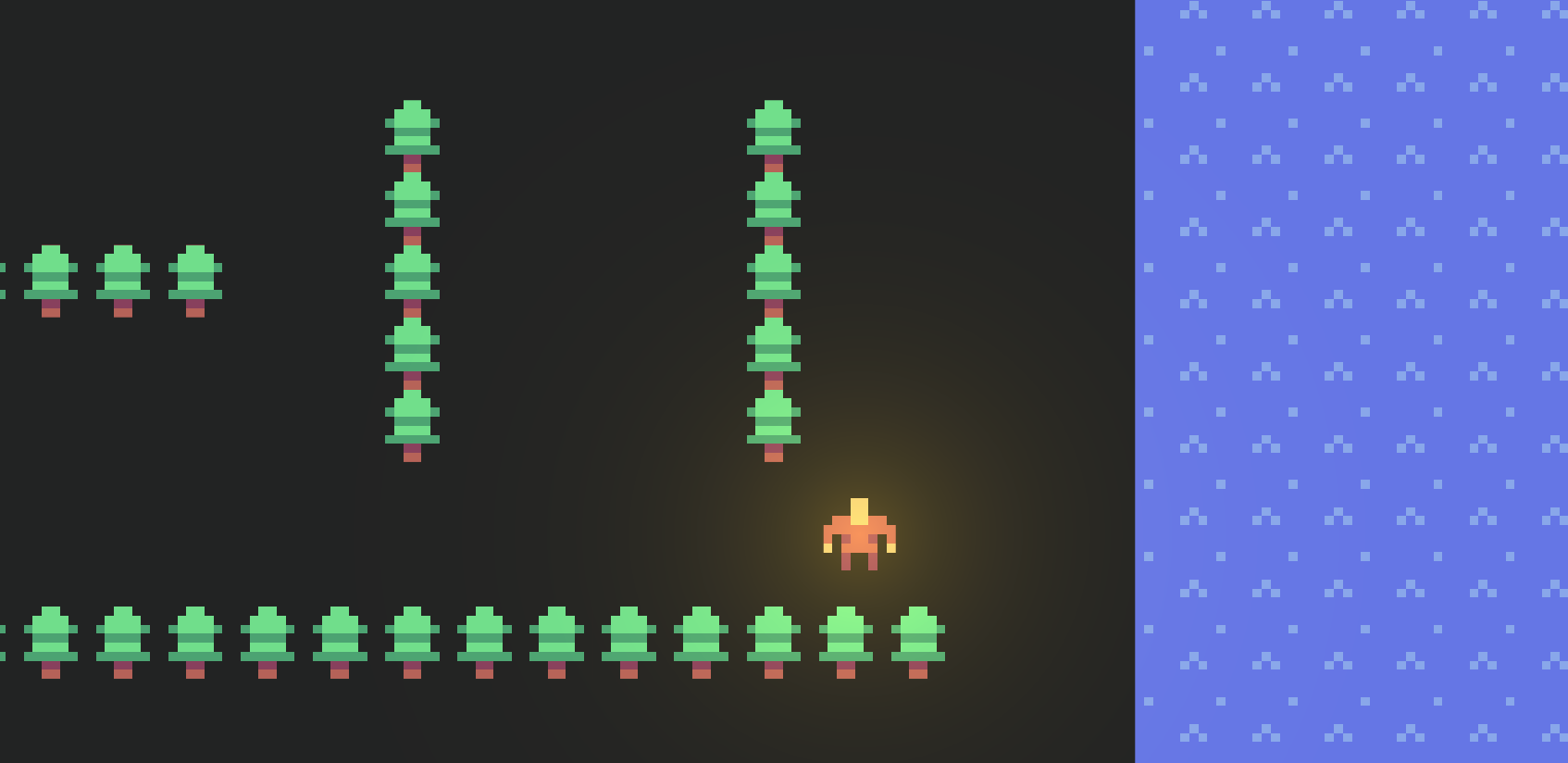
How can I make walls that stop the player from moving through them?
This example shows how to create walls that stop the player from exiting the play area, but also create a little maze of walls inside the play area for the player to navigate around. The camera will be zoomed in so the player won't be able to see the whole map at once, creating a sense of exploration and discovery.
This is a 2D top-down view game, but with a side-view, the walls could become platforms that the player could jump onto and walk across. The same principles apply.
Step 1: Define a Wall entity
Walls are simply entities that have a collider that stops other bodies from walking through them.
The key thing is to add immovable=true so that no amount of force can move the wall.
pub fn wall.Wall(pos, width, height, image?) {
    use body=this, shape=Rectangle(width=, height=)
    Body(pos=, immovable=true)
    PolygonCollider(category=Category:Wall)
    PolygonSprite(image=, tile=TileRadius)
}
In this example, we are taking an image parameter for the wall in order to give it some texture.
This is optional - when you are starting out you might just use a plain color for the wall and add the graphics later.
Step 2: Spawn walls around the edges of the screen
Spawn four walls around the edges of the screen to keep players from leaving the play area. Make them really thick so that even if the player is moving really fast, they will be unable to tunnel through the wall in a single physics tick.
    // Boundaries are just big walls that prevent the player from leaving the play area.
    Spawn wall { Wall(pos=@(100, 0), width=100, height=1000, image=@water.png) }
    Spawn wall { Wall(pos=@(-100, 0), width=100, height=1000, image=@water.png) }
    Spawn wall { Wall(pos=@(0, -100), width=1000, height=100, image=@water.png) }
    Spawn wall { Wall(pos=@(0, 100), width=1000, height=100, image=@water.png) }
This spawns four walls with a thickness of 100 around the edges of the screen.
Step 3: Spawn some internal walls
In our example, we will just spawn the walls randomly inside the play area. You could also spawn them manually in a hand-designed pattern.
To make things interesting, we are texturing our walls with a tree image, to make it look like the player is exploring a forest.
    for row in RangeInclusive(-9, 9) {
        for col in RangeInclusive(-9, 9) {
            if row == 0 && col == 0 { continue } // clear spawn point
            Spawn wall {
                let pos = @(5*col, 5*row)
                let vertical = Random < 0.5
                Wall(
                    pos=,
                    width = vertical ? 1 : 5,
                    height = vertical ? 5 : 1,
                    image = @tree.png,
                )
            }
        }
    }
Full Code Listing
pub tangible category Category:Wall
pub tangible category Category:Hero

const TileRadius = 0.5
const Tile = 2*TileRadius

pub game fn World.Main() {
    TopContent { "Arrow keys to move" }

    ImageSprite(body=@(0, 0), image=@ground.png, radius=TileRadius, repeatX=1000, repeatY=1000, layer=-100)

    // Boundaries are just big walls that prevent the player from leaving the play area.
    Spawn wall { Wall(pos=@(100, 0), width=100, height=1000, image=@water.png) }
    Spawn wall { Wall(pos=@(-100, 0), width=100, height=1000, image=@water.png) }
    Spawn wall { Wall(pos=@(0, -100), width=1000, height=100, image=@water.png) }
    Spawn wall { Wall(pos=@(0, 100), width=1000, height=100, image=@water.png) }

    // Inner walls
    for row in RangeInclusive(-9, 9) {
        for col in RangeInclusive(-9, 9) {
            if row == 0 && col == 0 { continue } // clear spawn point
            Spawn wall {
                let pos = @(5*col, 5*row)
                let vertical = Random < 0.5
                Wall(
                    pos=,
                    width = vertical ? 1 : 5,
                    height = vertical ? 5 : 1,
                    image = @tree.png,
                )
            }
        }
    }

    SpawnEachPlayer owner {
        Subspawn unit {
            Hero
        }
    }
}

pub fn wall.Wall(pos, width, height, image?) {
    use body=this, shape=Rectangle(width=, height=)
    Body(pos=, immovable=true)
    PolygonCollider(category=Category:Wall)
    PolygonSprite(image=, tile=TileRadius)
}

pub fn unit.Hero([owner]) {
    use body=this, radius=TileRadius, shape=Circle
    Body(pos=@(0, 0))
    ImageSprite(image=@hero.png, layer=1)
    PolygonSprite(shape=Circle(0), color=#fb04, bloom=7, bloomAlpha=1, luminous=1, layer=1)
    PolygonCollider(category=Category:Hero)
    Camera(radius=10, freeRadius=3)

    on BeforePhysics {
        let direction = @(0, 0)
        if IsButtonDown(ArrowLeft) { direction += @(-1, 0) }
        if IsButtonDown(ArrowRight) { direction += @(1, 0) }
        if IsButtonDown(ArrowUp) { direction += @(0, -1) }
        if IsButtonDown(ArrowDown) { direction += @(0, 1) }
        if direction == @(0, 0) { continue }

        Move(0.1 * direction)
    }
}