Bots
How can I make a bot that shoots projectiles at the nearest player?
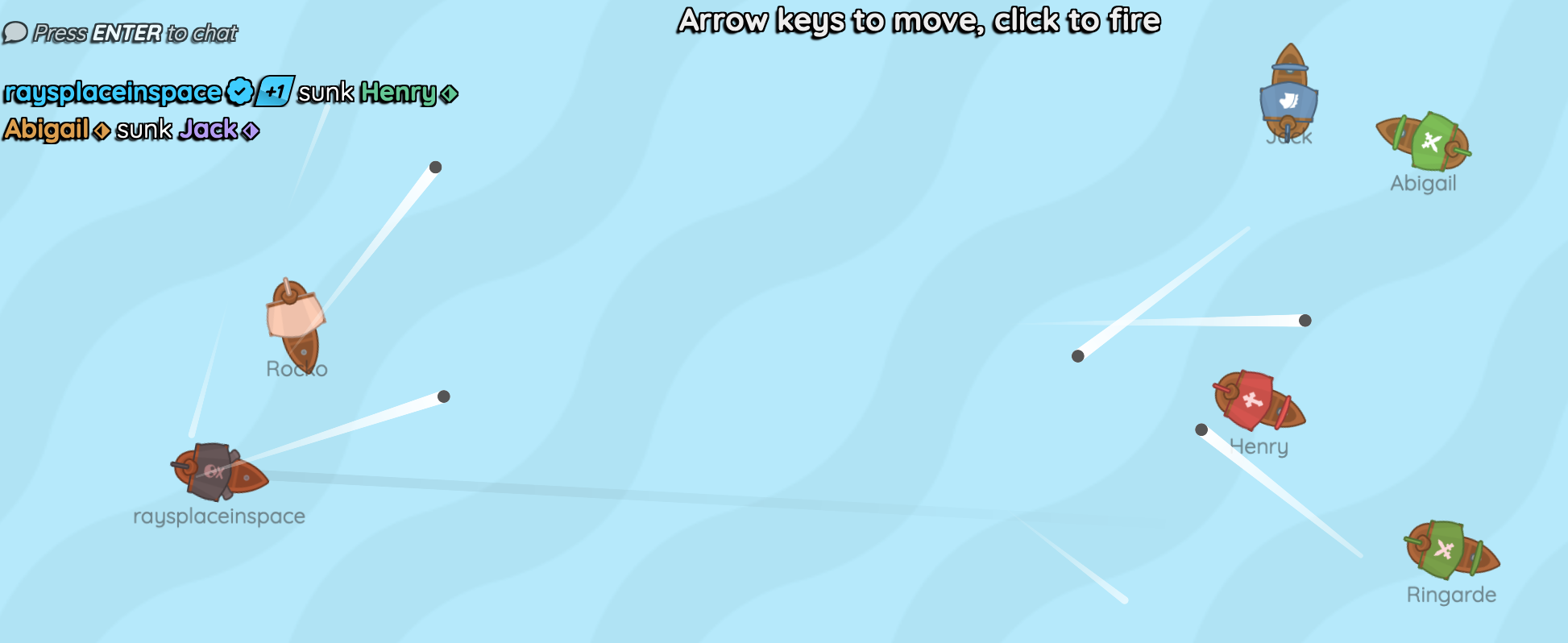
This is an example of a little multiplayer pirate ship game, where the game can be played against humans or bots.
Bots vs Mobs
Before you start, make sure you understand the difference between a bot and a mob:
-
A bot is a hero controlled by a computer, created using the SpawnBot function. The hero could have been controlled by a human player, but the computer is controlling it instead. The bot normally controls its hero by simulating inputs (button clicks, mouse movement, etc.).
-
A mob is an enemy controlled by the game. It can never be controlled by a human player. In fact, it is not a player at all, it is just an entity in the game world.
It is much more complex to implement a bot than a mob, so make sure that a bot is really what you want to implement, and not a mob. See Mobs for a simpler way to make mobs that shoot at players.
Step 1: Spawn some bots
First, use SpawnBot to spawn some bots in your game world.
You can do this in your Main function.
pub const BotNames = ["Rocko", "Jack", "Henry", "Abigail", "Ringarde"]
pub game fn World.Main() {
    // ...

    for botName in BotNames {
        SpawnBot(botName)
    }
}
In this example we've given our bots some names, but that is optional.
In a real game you might want to wait until the player clicks a Play vs AI button before spawning the bots, but for this example we will just spawn them immediately.
Step 2: Give a BotSystem to your hero
When a Hero is under the control of a bot, it needs to have a BotSystem to simulate inputs for it.
We will define what a BotSystem does in the next step.
pub fn unit.Hero([owner]) {
    // ...

    if !IsHuman {
        BotSystem
    }
}
Step 3: Define the BotSystem
A simple BotSystem simply runs every few ticks, finds the nearest player, and simulates a mouse click to shoot at them.
We're also making it pick a random target to move towards every few ticks, so that it doesn't just stand still.
fn unit.BotSystem([owner]) {
    use body=unit

    on Tick(3s * Random) {
        let enemy = QueryNearest(filter=Category:Hero, against=Alliance:Enemy)
        if !enemy { continue }
        Pointer = enemy.Pos
        ButtonDown(Click)
        ButtonUp(Click)
    }

    with Tick(3s * Random) {
        let target = @(SignedRandom*BoundaryHalfWidth, SignedRandom*BoundaryHalfHeight)
        Joystick = (target - Pos).Direction
        await Tick(2s)
        Joystick = @(0, 0)
    }
}
QueryNearestis used to find the nearest enemy player. As the nearestHerois always going to be itself, notice how we useagainst=Alliance:Enemyto only find other heroes.Pointeris used to aim at the enemy player's position.ButtonDown(Click)andButtonUp(Click)simulate a mouse click to shoot at the enemy. Both theButtonDownandButtonUpare needed to simulate a full click, withoutButtonUp, the bot would just hold down the mouse button and it would never shoot again.
Full Code Listing
pub tangible category Category:Hero
pub tangible category Category:Projectile

pub const BoundaryHalfWidth = 16
pub const BoundaryHalfHeight = 9

pub const MaxHealth = 3
pub prop unit.Health = MaxHealth

pub const BotNames = ["Rocko", "Jack", "Henry", "Abigail", "Ringarde"]

pub game fn World.Main(maxHumanPlayers=6) {
    Camera(@(0, 0), radius=@(BoundaryHalfWidth, BoundaryHalfHeight))
    ImageSprite(body=@(0,0), image=@water.png, radius=3, repeatX=100, repeatY=100, layer=-100)

    TopContent {
        P(bold=true, fontSize=1.2) {
            "Arrow keys to move, click to fire"
        }
    }

    SpawnEachPlayer owner {
        loop {
            await Spawn unit {
                Hero
            }
            await Tick(1s)
        }
    }

    for botName in BotNames {
        SpawnBot(botName)
    }
}

pub fn unit.Hero([owner]) {
    use body=this, radius=0.5, extent=0.5, shape=Capsule(radius=, extent=)
    let image = PickRandom(@ship-*.png)

    Body(pos=@(SignedRandom*BoundaryHalfWidth, SignedRandom*BoundaryHalfHeight))

    Strand(to=Position:AtPointer, radius=0.1, color=#0000, fade=#0001, layer=-1, audience=owner)

    with Health {
        ImageSprite(
            image=, radius=(radius+extent), angleOffset=-0.25rev,
            color=(Health / MaxHealth).Mix(#f88, #fff),
        )
    }

    PolygonCollider(category=Category:Hero)
    TextSprite(PlayerName, color=#3338, radius=0.25, screenOffset=@(0, 0.1 + radius), vAlign=VAlign:Top, noRotation=true)
    DecaySpeed(0.01)
    DecayTurnRate(0.01)

    on BeforePhysics {
        if Joystick == @(0, 0) { continue }

        if Velocity.Dot(Joystick.Direction) < 5 {
            Velocity += 0.1 * Joystick
            Heading = Velocity.Angle
        }
    }

    on ButtonDown(Click) {
        Spawn projectile {
            Cannonball(heading=Angle(Pointer - Pos), parent=unit)
        }
        await Tick(0.5s)
    }

    let lastAttacker = null
    on BeforeCollide that {
        if that.Category.Overlaps(Category:Projectile) {
            Strobe(shine=0.5, growth=0.1)
            lastAttacker = that.Owner
        }
    }

    with Health {
        if Health <= 0 {
            if lastAttacker {
                Print(audience=Audience:All, duration=7s) {
                    P {
                        PlayerNameDisplay(lastAttacker)
                        " sunk "
                        PlayerNameDisplay
                    }
                }
            }
            repeat 10 {
                Spark(
                    color=#f40, luminous=1, radius=0.1, shine=0.2, bloom=1,
                    splatter=1, speed=3, dissipate=1s,
                )
            }
            Expire
        }
    }

    if !IsHuman {
        BotSystem
    }
}

fn unit.BotSystem([owner]) {
    use body=unit
    on Tick(3s * Random) {
        let enemy = QueryNearest(filter=Category:Hero, against=Alliance:Enemy)
        if !enemy { continue }

        Pointer = enemy.Pos
        ButtonDown(Click)
        ButtonUp(Click)
    }

    with Tick(3s * Random) {
        let target = @(SignedRandom*BoundaryHalfWidth, SignedRandom*BoundaryHalfHeight)
        Joystick = (target - Pos).Direction
        await Tick(2s)
        Joystick = @(0, 0)
    }
}

pub fn projectile.Cannonball(heading, parent, [owner]) {
    use body=this, radius=0.125, shape=Circle, color=#555, layer=10
    Body(pos=parent.Pos, velocity=7*heading.Direction)
    PolygonSprite
    PolygonCollider(category=Category:Projectile, parent=)
    DecaySpeed(0.005)

    on Paint {
        Streak(color=#fff, fade=1, dissipate=1s, layer=layer-1)
    }

    once Tick(1.5s) { Expire }
    on BeforeCollide that {
        if that.Category.Overlaps(Category:Hero) {
            that.Health -= 1
        }
        Expire
    }
    once BeforeDespawn {
        repeat 5 { Spark(splatter=1, dissipate=0.25s) }
    }
}