Shop
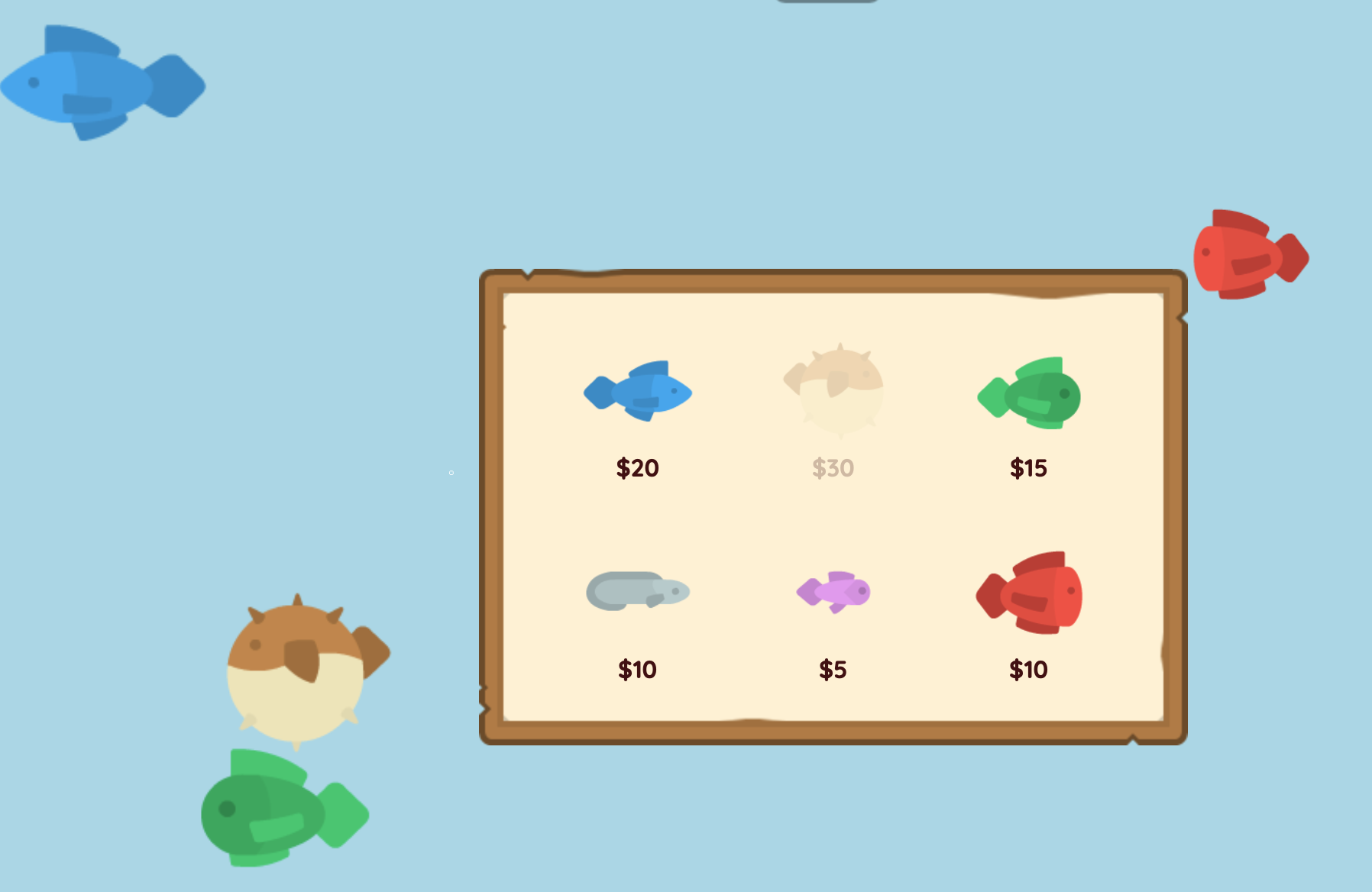
How can I make a shop where a player can buy items or upgrades in-game?
This example shows you how to make a shop, assuming you have some source of money in your game. See the Coins example for a simple way to pick up coins in your game.
Step 1: Define prices
In our example, players can make a little aquarium and buy fish to put in it. Each fish has a different price. We can store these costs in a Map.
pub const FishCosts = {
    blue = 20,
    brown = 30,
    green = 15,
    grey = 10,
    pink = 5,
    red = 10,
}
Step 2: Define a ShopDialog
Now we will create a ShopDialog that will display the available fish and their prices.
pub fn dialog.ShopDialog([owner]) {
    OverlayContent {
        ImagePanel(frameImage=@panel_brown_damaged.png, padding=2, align=Align:Center) {
            HStack(wrap=true, width=25, align=Align:Center) {
                ShopChoiceButton($blue, image=@fish_blue.png)
                ShopChoiceButton($brown, image=@fish_brown.png)
                ShopChoiceButton($green, image=@fish_green.png)
                ShopChoiceButton($grey, image=@fish_grey.png)
                ShopChoiceButton($pink, image=@fish_pink.png)
                ShopChoiceButton($red, image=@fish_red.png)
            }
        }
    }
}
pub fn ShopChoiceButton(choice, image, [owner, ui]) {
    let cost = FishCosts[choice]
    FlatButton(PressIntent<buy>(choice), hoverColor=#cba, opacity=(Money >= cost ? 1 : 0.25)) {
        VStack(align=Align:Center, gap=0) {
            Image(image, height=5)
            P(color=#411, stroke=false) { "$" + cost }
        }
    }
}
-
We have chosen to use a
ImagePanelframe for our shop to give it a nice background. When you are making panels in your own game, you may want to start with just a simplePaneland style it later. -
To give every option the same style, we have created a
ShopChoiceButtonfunction that takes the choice and image as parameters. Each option has aPressIntentthat will trigger when the player clicks on it. We will handle this intent in the next step to make the player buy the item.
Step 3: Buying from the ShopDialog
When the player clicks on an option, we want to make the player buy the item, if they have enough money.
pub fn dialog.ShopDialog([owner]) {
    // ...

    once Pressed<buy> choice {
        let cost = FishCosts[choice]
        if Money >= cost {
            Money -= cost
            match choice {
                $blue => Spawn unit { Fish(image=@fish_blue.png, radius=0.75, extent=1) },
                $brown => Spawn unit { Fish(image=@fish_brown.png, radius=1.5, extent=0) },
                $green => Spawn unit { Fish(image=@fish_green.png, radius=0.5, extent=1) },
                $grey => Spawn unit { Fish(image=@fish_grey.png, radius=0.5, extent=1) },
                $pink => Spawn unit { Fish(image=@fish_pink.png, radius=0.5, extent=1) },
                $red => Spawn unit { Fish(image=@fish_red.png, radius=1, extent=0) },
            }
        }
        Expire
    }
}
- This uses a
matchblock to spawn the correct fish unit based on the choice the player made. In your own game, this might be where you give the player a new weapon, upgrade their stats, or unlock a new ability.
Step 4: Opening the ShopDialog
In our simple game, the player opens the shop by just clicking a button.
We will make a ShopSystem that displays a "Shop" button at the top of the screen, and opens the ShopDialog when the player clicks it.
pub prop owner.PreviousShopDialog
pub fn this.ShopSystem([owner]) {
    TopContent {
        RaisedButton(PressIntent<shop>, backgroundColor=Color:Primary) { "Shop" }
    }

    on Pressed<shop> {
        PreviousShopDialog ???= Subspawn dialog {
            ShopDialog
        }
    }
}
Now we just need to add the ShopSystem to each player:
    SpawnEachPlayer owner {
        // ...

        ShopSystem
    }
-
The
PreviousShopDialogproperty is used to keep track of the shop dialog that was spawned, so that we don't spawn it twice if the player is already in the shop. -
When the player closes the shop dialog,
PreviousShopDialogwill still point to an entity, but it will no longer exist. The???=operator is the "existential assignment" operator and will only execute its right-hand side if the left-hand side does not exist. This is how it opens a new shop dialog when the previous one has been closed. -
In other games, you might trigger the shop by walking up to a shopkeeper, or by pressing a key when near a shop. Whatever method, you just need to
Subspawn dialogat the right time.
Full Code Listing
pub const BoundaryHalfWidth = 16
pub const BoundaryHalfHeight = 9

pub prop owner.Money = 0

pub game fn World.Main() {
    Camera(@(0, 0), radius=@(BoundaryHalfWidth, BoundaryHalfHeight))
    SolidBackground(#a6d6e6)

    SpawnEachPlayer owner {
        Money = 100

        BottomContent {
            InsetPanel {
                P(bold=true) {
                    with Money { "You have: $" + Money }
                }
            }
        }

        ShopSystem
    }
}

pub prop owner.PreviousShopDialog
pub fn this.ShopSystem([owner]) {
    TopContent {
        RaisedButton(PressIntent<shop>, backgroundColor=Color:Primary) { "Shop" }
    }

    on Pressed<shop> {
        PreviousShopDialog ???= Subspawn dialog {
            ShopDialog
        }
    }
}

pub fn dialog.ShopDialog([owner]) {
    OverlayContent {
        ImagePanel(frameImage=@panel_brown_damaged.png, padding=2, align=Align:Center) {
            HStack(wrap=true, width=25, align=Align:Center) {
                ShopChoiceButton($blue, image=@fish_blue.png)
                ShopChoiceButton($brown, image=@fish_brown.png)
                ShopChoiceButton($green, image=@fish_green.png)
                ShopChoiceButton($grey, image=@fish_grey.png)
                ShopChoiceButton($pink, image=@fish_pink.png)
                ShopChoiceButton($red, image=@fish_red.png)
            }
        }
    }

    once Pressed<buy> choice {
        let cost = FishCosts[choice]
        if Money >= cost {
            Money -= cost
            match choice {
                $blue => Spawn unit { Fish(image=@fish_blue.png, radius=0.75, extent=1) },
                $brown => Spawn unit { Fish(image=@fish_brown.png, radius=1.5, extent=0) },
                $green => Spawn unit { Fish(image=@fish_green.png, radius=0.5, extent=1) },
                $grey => Spawn unit { Fish(image=@fish_grey.png, radius=0.5, extent=1) },
                $pink => Spawn unit { Fish(image=@fish_pink.png, radius=0.5, extent=1) },
                $red => Spawn unit { Fish(image=@fish_red.png, radius=1, extent=0) },
            }
        }
        Expire
    }
}
pub fn ShopChoiceButton(choice, image, [owner, ui]) {
    let cost = FishCosts[choice]
    FlatButton(PressIntent<buy>(choice), hoverColor=#cba, opacity=(Money >= cost ? 1 : 0.25)) {
        VStack(align=Align:Center, gap=0) {
            Image(image, height=5)
            P(color=#411, stroke=false) { "$" + cost }
        }
    }
}

pub const FishCosts = {
    blue = 20,
    brown = 30,
    green = 15,
    grey = 10,
    pink = 5,
    red = 10,
}

pub prop unit.Facing = 1
pub fn unit.Fish(image, radius, extent) {
    use body=this, shape=Capsule(radius=, extent=)
    Body(pos=@(SignedRandom*BoundaryHalfWidth, SignedRandom*BoundaryHalfHeight), noRotation=true)
    PolygonCollider(category=Category:Default)
    DecaySpeed(0.1)

    with Facing {
        ImageSprite(image=, radius=radius+extent, bodyScale=@(Facing, 1))
    }

    on Tick(1s) {
        let target = @(SignedRandom*BoundaryHalfWidth, SignedRandom*BoundaryHalfHeight)

        loop {
            let delta = target - Pos
            Facing = delta.X >= 0 ? 1 : -1
            if delta.Length < 1 { break }

            let direction = delta.Direction
            if Velocity.Dot(direction) < 2.5 {
                Velocity += 0.2 * direction
            }
            await BeforePhysics
        }
    }

    on Tick(10s*Random) {
        repeat 3 {
            ImageSpark(image=PickRandom(@bubble_*.png), radius=1, velocity=@(0, -2), splatter=1, dissipate=3s, layer=-1)
            await Tick(0.25s)
        }
    }
}