Camera Rotation
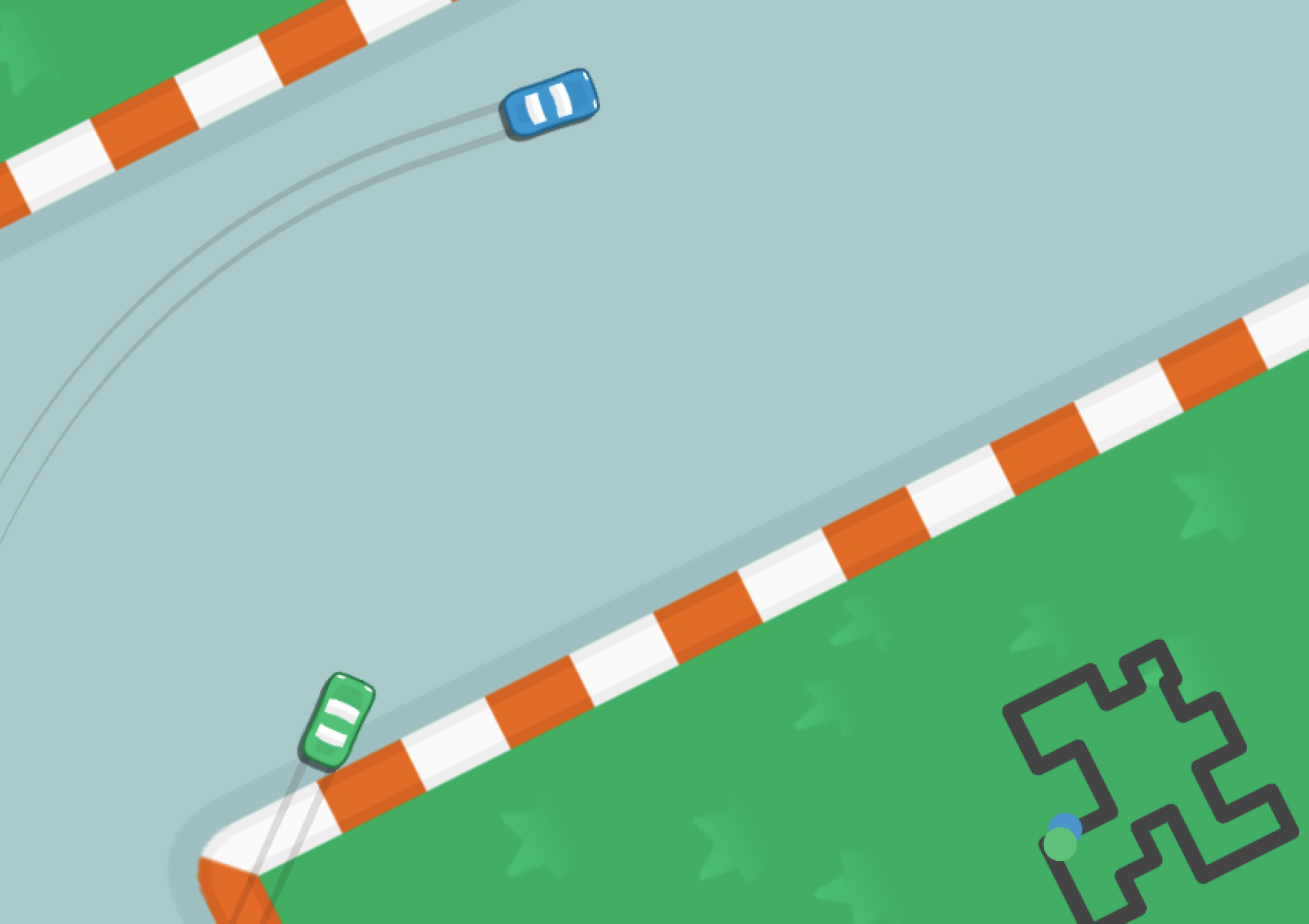
How can I make the camera rotation follow the rotation of an object in my game?
This is an example of a racing game where the camera rotates to follow a racing car as it moves around the track. This helps the player to see the track from the perspective of the car, and makes it easier to drive.
This example makes the camera rotate with a body in the game world.
When the body rotates, the camera rotates with it.
If you just want to rotate the camera by a fixed amount,
you can simply use the heading parameter of the Camera function.
For example, this will rotate the camera by 90 degrees (0.25 revolutions):
Camera(body=@(0,0), heading=0.25rev)
Step 1: Make the camera follow the car
First, let's make the camera just follow the car without rotating:
pub fn unit.Car(color, [owner]) {
    use body=this
    // ...
    on Paint {
        // Zoom out and look further ahead when going faster
        let tilesPerSecond = Speed / TileSize
        Camera(
            radius=(4*TileSize + 0.5*tilesPerSecond), bodyOffset=@(2.5*tilesPerSecond, 0),
            acquireRate=1, panningRate=0.02,
        )
    }
We use the Camera function to aim the camera at the car. Because our car is driving fast, we also zoom out and look further ahead to give the player more time to react to upcoming turns.
Step 2: Rotate the camera with the car
Now, let's make the camera rotate with the car:
pub fn unit.Car(color, [owner]) {
    use body=this
    // ...
    on Paint {
        // Zoom out and look further ahead when going faster
        let tilesPerSecond = Speed / TileSize
        Camera(
            radius=(4*TileSize + 0.5*tilesPerSecond), bodyOffset=@(2.5*tilesPerSecond, 0),
            acquireRate=1, panningRate=0.02,
            noRotation=false, angleOffset=0.25rev,
        )
    }
    // ...
- By default, the
noRotationparameter istrue, so we set it tofalseto allow the camera to rotate with the car. - Normally an angle of
0revpoints to the right. When the car is driving forwards we want it to go upwards on the screen rather than to the right, so we also setangleOffset=0.25revto rotate the camera by 90 degrees.
Step 3: Rotate the minimap with the car
Let's make the minimap also rotate with the car as well, so it's easy for players to see what is coming up on the track:
pub fn unit.Car(color, [owner]) {
    use body=this
    // ...
    Camera(
        camera=Camera:Minimap, radius=160*TileRadius,
        body=@(0, 0),
        heading=unit, angleOffset=0.25rev,
        acquireRate=1, panningRate=0.02
    )
    // ...
}
We want the entire track to be visible on the minimap at all times.
For that reason, we only want the minimap to rotate with the car, but not pan (move sideways) with it.
So we set body=@(0, 0) to keep the minimap centered on the track.
The heading=unit parameter means the minimap camera tracks the heading of the car.
Once again, we set angleOffset=0.25rev to rotate the minimap by 90 degrees so that forwards on the car is upwards on the minimap.
Step 4: Keep the player's name upright on the screen
Now let's display the player's name underneath each car.
Since this is text, we want it to always be upright on the screen, so we set upright=true:
pub fn unit.Car(color, [owner]) {
    // ...
    TextSprite(PlayerName, upright=true, color=, screenOffset=@(0, 1.25*TileRadius), fontSize=1, bold=true, vAlign=VAlign:Top)
}
The upright=true parameter locks the rotation of the TextSprite to the camera's rotation,
so it always appears upright on the screen.
Full Code Listing
Thanks to Kenney for the art used in this example! This map was made with Tiled, a popular map editor for 2D games.
pub const TileRadius = 1
pub const TileSize = 2*TileRadius

pub tangible category Category:Track
pub tangible category Category:Car

pub const TrackPath = [
    @(-13,-12), @(-2,-12), @(-2,-4), @(6,-4), @(6,-9), @(13,-9), @(13,1), @(9,1),
    @(9,5), @(12,5), @(12,9), @(8,9), @(8,8), @(4,8), @(4,12), @(-2,12), @(-2,7),
    @(-8,7), @(-8,13), @(-13,13), @(-13,2), @(-5,2), @(-5,-2), @(-9,-2), @(-9,-6),
    @(-13,-6), @(-13,-12),
].Map(|x| x*8)

pub const CarImages = {
    #3f95ce = @car_blue_3.png,
    #50c175 = @car_green_3.png,
    #e06b28 = @car_red_3.png,
    #fccb30 = @car_yellow_3.png,
}

pub const Camera:Minimap = Spawn camera {
    Viewport(scale=0.3, anchor=@(1, 1))
    Camera(body=@(0, 0), radius=128*TileRadius)
}

pub game fn World.Main(maxHumanPlayers=4) {
    ShadowOffset=@(-0.1*TileRadius, 0.1*TileRadius)

    ImageSprite(image=@row-1-column-1.png, body=@(-64,-64)*TileRadius, radius=64*TileRadius, layer=-99)
    ImageSprite(image=@row-1-column-2.png, body=@(64,-64)*TileRadius, radius=64*TileRadius, layer=-99)
    ImageSprite(image=@row-2-column-1.png, body=@(-64,64)*TileRadius, radius=64*TileRadius, layer=-99)
    ImageSprite(image=@row-2-column-2.png, body=@(64,64)*TileRadius, radius=64*TileRadius, layer=-99)

    Spawn track {
        Track
    }

    let nextColorIndex = 0
    SpawnEachPlayer owner {
        let color = CarImages.MapKeys[nextColorIndex]
        nextColorIndex += 1

        Subspawn unit {
            Car(color=)
        }
    }

    SpawnBot("Carmichael")
}

pub fn track.Track() {
    use body=this, shape=Line(TrackPath, cap=true, radius=7)
    Body(pos=@(0, 0), immovable=true)
    PolygonCollider(shape=, category=Category:Track, sense=true)
    PolygonSprite(shape=, color=#444, camera=Camera:Minimap, layer=-100)
}

pub fn unit.Car(color, [owner]) {
    use body=this, radius=TileRadius, shape=Capsule(extent=0.5*radius, radius=0.5*radius)
    let image = CarImages[color]
    Body(pos=TrackPath[0] + 3*TileRadius*RandomVector)
    ImageSprite(image=, radius=, shadow=0.5, angleOffset=0.25rev)
    PolygonSprite(shape=Circle(radius=15), color=, camera=Camera:Minimap)
    TextSprite(PlayerName, upright=true, color=, screenOffset=@(0, 1.25*TileRadius), fontSize=1, bold=true, vAlign=VAlign:Top)
    PolygonCollider(shape=, category=Category:Car)
    DecayTurnRate

    CheckpointSystem
    if !IsHuman { BotSystem }

    Camera(
        camera=Camera:Minimap, radius=160*TileRadius,
        body=@(0, 0),
        heading=unit, angleOffset=0.25rev,
        acquireRate=1, panningRate=0.02
    )

    on Paint {
        // Zoom out and look further ahead when going faster
        let tilesPerSecond = Speed / TileSize
        Camera(
            radius=(4*TileSize + 0.5*tilesPerSecond), bodyOffset=@(2.5*tilesPerSecond, 0),
            acquireRate=1, panningRate=0.02,
            noRotation=false, angleOffset=0.25rev,
        )
    }

    on Paint {
        // Tire tracks
        Streak(color=#2112, dissipate=1s, bodyOffset=@(0, -0.3*radius), radius=0.1*radius, layer=-1)
        Streak(color=#2112, dissipate=1s, bodyOffset=@(0, 0.3*radius), radius=0.1*radius, layer=-1)
    }

    on BeforePhysics {
        // Acceleration
        if IsButtonDown(ArrowUp) {
            Velocity += 0.1 * Heading.Direction
        }

        // Turning
        if IsButtonDown(ArrowLeft) {
            Velocity = 0.995 * Velocity + 0.02 * Velocity.RotateLeft
        }
        if IsButtonDown(ArrowRight) {
            Velocity = 0.995 * Velocity + 0.02 * Velocity.RotateRight
        }

        // Friction
        let speedDecay = (
            if IsButtonDown(ArrowDown) { 0.95 }
            else if IsButtonDown(ArrowUp) { 0.9975 }
            else { 0.985 }
        )
        if !QueryAnyContact(filter=Category:Track) {
            speedDecay *= 0.975
        }
        Velocity *= speedDecay

        // Align heading to velocity, unless stationary
        if Speed > 0.1 {
            Heading = Velocity.Angle
        }
    }
}

pub prop unit.CheckpointIndex = 0
pub fn unit.CheckpointSystem([owner]) {
    use body=unit

    // Switch to the next checkpoint when the current one has been reached
    let lapStart = Tick
    on AfterPhysics {
        let checkpoint = TrackPath[CheckpointIndex]
        if Distance(checkpoint, Pos) > 12 { continue }
        CheckpointIndex = (CheckpointIndex + 1) % TrackPath.Length

        // Completed a lap
        if CheckpointIndex == 0 {
            let seconds = (Tick - lapStart) / 1s
            DisplayLapCompleted(seconds=)
            lapStart = Tick
        }
    }

    // Stopwatch display
    TopContent {
        H1(fontSize=2, bold=true) {
            on Tick(0.1s) {
                %(((Tick - lapStart) / 1s).FormatWithDecimals(1) + "s")
            }
        }
    }
}
fn DisplayLapCompleted(seconds, [owner]) {
    PrintTop(duration=20s) {
        P(fontSize=2, bold=true, animate=Animate:FlyFromBottom) {
            "Lap completed in " + seconds.FormatWithDecimals(1) + " seconds!"
        }
    }
    Print(audience=Audience:All, duration=20s) {
        P {
            PlayerNameDisplay
            " took "
            Span(bold=true) { %(seconds.FormatWithDecimals(1) + "s") }
        }
    }
}

pub fn unit.BotSystem([owner]) {
    use body=unit

    // Turning
    on Tick {
        let previousCheckpoint = TrackPath[(CheckpointIndex - 1 + TrackPath.Length) % TrackPath.Length]
        let nextCheckpoint = TrackPath[CheckpointIndex]

        // Aim for a mix of staying on the track and the next checkpoint
        let closestPointOnTrack = (
            let delta = nextCheckpoint - Pos
            let normal = (nextCheckpoint - previousCheckpoint).Direction.RotateRight
            let towardsTrack = normal * delta.Dot(normal)
            Pos + towardsTrack
        )
        let target = (0.5).Mix(closestPointOnTrack, nextCheckpoint)

        let aim = (target - Pos).Angle
        let angleDelta = Heading.AngleDelta(aim)
        if angleDelta < -0.01rev {
            ButtonDown(ArrowLeft)
            ButtonUp(ArrowRight)
        } else if angleDelta > 0.01rev {
            ButtonDown(ArrowRight)
            ButtonUp(ArrowLeft)
        } else {
            ButtonUp(ArrowLeft)
            ButtonUp(ArrowRight)
        }
    }

    // Acceleration - press UP most of the time
    behavior {
        loop {
            ButtonDown(ArrowUp)
            await Tick(5s)
            ButtonUp(ArrowUp)
            await Tick
        }
    }
}