Data-Driven Games (October 2026 update)

Up until this point, Easel has been best at making procedurally-generated games where the game world is created by algorithms in the game code itself. The new data file import feature lets you author content in other software programs and import them into Easel! This allows you to make much bigger, richer games using the best tools for the job, importing the results back into Easel to turn them into a multiplayer game.
The great challenge of designing a data import system is that it needs to be flexible. There are many potential data sources whether they be map editors (like Tiled), sprite animation tools (like Spine) or spreadsheets (like Microsoft Excel), each with their own structure and format. But most of all, as all things we Easel, we want it to be simple. Keep reading to learn more about the design trade-offs we chose to make this feature simple yet powerful.
Easel is a browser-based 2D game programming language that makes your game multiplayer automatically! Intrigued? Visit our home page to learn more.
Data Import
In its simplest form, the new import statement lets you take raw data and assign it to a variable in your game code:
pub import Level1Data from @level1.json
This lets you get started quickly with just a single line of code, but it is not the most powerful way to use data files in Easel.
Converting to a schema
JSON, a common data interchange format, supports only simple types like Strings and Numbers, whereas Easel supports a much richer set of types, including Vectors, Symbols, Colors, Assets, and more. The first task of any data import is to convert the data into Easel's richer types so they are ready to use in your game.
For this reason, when importing data into Easel using the import statement,
you can use the as keyword to specify a schema to convert to:
pub import CountryData from @world.geo.json as {
    features as [{
        id = properties.iso_a2 as String,
        name = properties.sovereignt as String,
        labelPos = @(properties.label_x, properties.label_y),
        geometry as {
            type as String,
            coordinates as [[Vector] | [[Vector]]],
        },
    }]
}
A schema looks very similar to a type definition you might find in a language like TypeScript, making it appear immediately familiar. However, unlike TypeScript, it doesn't just describe the shape of the data as-is, it can include rules to transform the data into a different shape more useful for your game code. Here are some examples of the transformations we are doing in this schema:
- Remapping:
id = properties.iso_a2remaps theiso_a2property to a new nameid. - Conversion:
labelPos = @(properties.label_x, properties.label_y)converts two separate properties into a single Vector, ready to be used in your game code. - Alternations:
coordinates as [[Vector] | [[Vector]]]allows for two different shapes of data to be accepted. The GeoJSON format sometimes adds an extra level of nesting to the coordinates, depending on the type of geometry (Polygon vs MultiPolygon). This lets us handle both cases in a single schema.
Turing-complete?
One of the major decision points when designing schemas was deciding how much power to give them. We already have a powerful Turing-complete programming language in Easel, so we decided to keep schema definitions simple. Schemas will get you most of the way there in a concise, readable way. Anything more complex you can always do in Easel code after the data is imported.
We searched along the spectrum of possibilities to settle on this seemingly-obvious design:
- On one hand, we looked at performing the conversions by running Easel itself at compile time, like Zig does with its compile-time execution feature. This turned out to be unnecessarily verbose. Schemas let you express the many repetitive data conversion rules in a much more compact, less noisy, manner.
- We also explored introducing escape hatches into schema definitions to drop into Easel code for more complex conversions. The interleaving of two languages was confusing to read as they have different interpretations of the same syntax, requiring you to be constantly aware of which mode you are in.
Compile-time conversion
Dynamic programming languages are great for rapid prototyping and iteration, but they can be error-prone. Static programming languages require you to declare more up front, but they can catch errors early and increase your productivity in the long run.
Easel itself is an unusual combination of both static and dynamic programming. Specifically, it has dynamic typing, but static function calls. When designing Easel, we felt this was the best of both worlds. As a game programming language, it is common for functions to take a lot of optional parameters (PolygonSprite takes 40 parameters!) and so static functions helps you make sure you typed them out correctly.
We felt that data import is another case where static checking is important. For that reason, data import is done at compile time, and any mismatches between the data file and the schema are reported as compile-time errors. This helps you quickly iterate and make sure your data and schema are in sync before you even run your game.
Performance
The compile-time data import is not just about finding errors early.
- It also means your game starts faster because the data is already processed when the game starts.
- Only the data referenced by the schema is imported, reducing the size of your game download for your players.
Static data
Easel uses rollback netcode to make your game multiplayer automatically, and one of the key considerations for rollback performance is minimizing the amount of data that needs to be rolled back. A big part of this was introducing incremental rollback netcode, where only the changes to the game state are snapshotted and rolled back. But the fastest way to do something is to not do it at all, and for that reason, data files are imported as static and cannot be changed at all:
pub import WorldData from @world.geo.json
WorldData.features[123].name = "Gulf of Easel" // ❌ causes a runtime error
This means data files can be completely excluded from even being considered by the rollback system, which means even if your file is as big as the whole world, it will not slow down your multiplayer game. You can import big datasets without fear!
Supporting static collections required changing the way Arrays and Maps are handled throughout the entire engine, but if it all has gone well, you'll never notice the difference in your game.
JSON and CSV
Easel supports importing data from JSON and CSV files, two of the most common formats for data interchange. A big reason for CSVs was to support LDtk, which exports its tilemap in CSV format. Consequently, this means Easel can now import data from programs such as:
- Tiled, a popular level editor
- LDtk, the aforementioned level editor
- Spine, a sprite animation tool
- Want to make a word-guessing game? You could make a list of words in Google Sheets or Microsoft Excel, export it to CSV, and import it into Easel!
Geography Dash
To demonstrate what's possible with this new data import feature, we chose to import a dataset that we can all identify with: the world. In Geography Dash, you race your friends to fly to a country on the world map. Do you know where Eritrea is? Can you fly to it with the map upside down? Play it and find out!
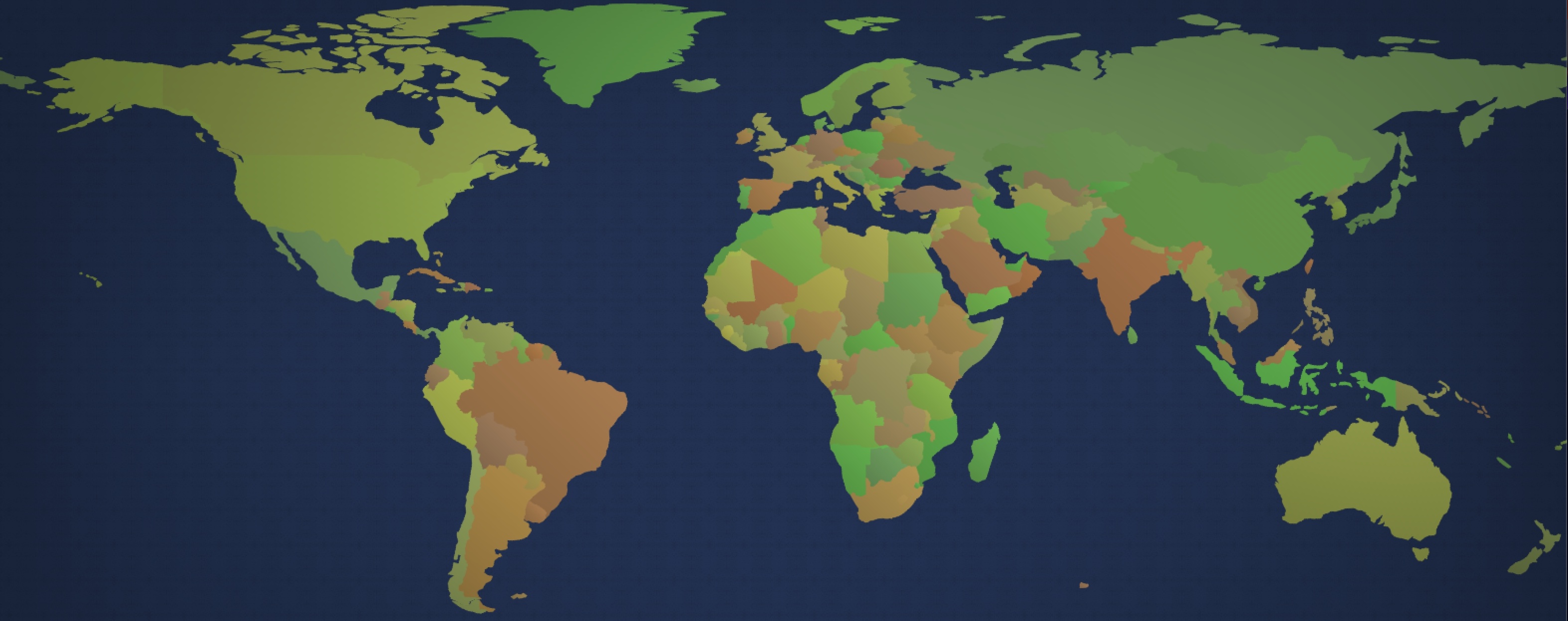
Natural Earth is a public domain dataset created by a team of volunteers led by Nathaniel Vaughn Kelso and Tom Patterson. Thanks to them and Easel, you can now race your friends around the world in an epic multiplayer game of global proportions!
Learn more
See Data Files to learn more about this new feature, including how to define schemas and how to import data from CSV files.
Other changes this month
- Added SymbolName, SymbolFromName and ToSymbol functions to convert between Symbols and Strings.
Thanks for being here!
Thank you for your continued support of Easel!
If you haven't already, check out this Easel game made this month!